Agent Registry
A governed catalog of agents, gateways, and skills published to the AWS Agent Registry. Each entry carries its owner, auth model, version, protocol, and the tools or capabilities it offers — so any MCP-aware agent can discover and reason about it. Items you can use with your role are unlocked; others are visible but locked.
- Catalogs agents, MCP servers, tools, skills — hosted anywhere (Runtime, EKS, off-AWS).
- Approval workflow: Draft → Pending → Approved. Only approved records appear in search.
- Discovery: people (console/IDE/MCP) and agents (A2A) find approved resources and their endpoints.
- No authentication — who may call an agent is AgentCore Identity (your Entra/Cognito JWT).
- No authorization / model access — which role may use which tool is Gateway + Cedar.
- No native grouping yet — use a separate registry per domain (roadmap: packages).
- Rejecting a record ≠ blocking calls — it only hides it from search; a Cedar forbid policy does the actual blocking.
So "who has access to the models/agents?" is answered by Identity (authN) + Gateway + Cedar (authZ) — not the Registry. The 🔒 lock badges below just mirror that Cedar policy so the catalog reflects reality.
Token Usage & Limits
Per-user token consumption against per-role budgets. When a user exceeds their budget, further requests are blocked with a 429 — governance that complements Cedar access control.
Auth — how you got here, and what you can do
Everything below is derived from your actual signed-in token. Inbound auth is AgentCore Identity (Microsoft Entra ID → Cognito JWT); your capability claim decides your role, which drives per-tool authorization at the Gateway via Cedar.
Security — layered safeguards against prompt injection & data leakage
Prompt injection is #1 on the OWASP Top 10 for LLM apps, and it can't be fully fixed inside the model: an LLM can't reliably tell trusted instructions from untrusted text. So this agent enforces security outside the model, in independent layers. The design rule: a fully prompt-injected agent still can't exceed the authority in your token. Everything below is live. The lab runs your text through the deployed agent's real filters and its real Bedrock Guardrail.
SpiceDB — relationship-based access (ReBAC)
A real SpiceDB (Zanzibar) server runs on ECS Fargate, reachable only from an in-VPC Lambda. It answers permission questions by walking relationships recursively (document → folder → parent folder → viewer) — the thing Cedar's attribute rules structurally can't do. Below is the live schema, the current relationships, and an interactive check. Admins can add or remove relationships and watch access change in real time.
view from its folder, which inherits from its parent folder). That
recursive, relationship-based traversal is the thing Cedar (attribute/role) structurally can't express,
which is why this demo runs both: Cedar at the Gateway for "under what conditions can this role
act," SpiceDB for "who can reach this resource."
- Schema (the
.zedshown below) — object types (user, group, folder, document, location, capability, case, ai_agent…), their relations, and permissions computed with operators:+union,&intersection,-exclusion (deny wins),->arrow (follow a relation to another object). - Relationships (the tuples) — the data, each a
resourceType:resourceId#relation@subjectType:subjectIdfact, e.g.document:cr-1001-notes#parent_case@case:case-1001. A permission check walks these tuples for a path from the subject to the resource+permission.
{{resource, permission, subject}} and returns a permissionship
(HAS_PERMISSION / NO_PERMISSION / CONDITIONAL); a write sends
{{updates:[{{operation:"TOUCH"|"DELETE", relationship:{{…}}}}]}}. The live schema and
tuples are shown further down; all of it goes through an in-VPC Lambda, since the server is private
to the VPC.Ask a question ("what is denied to analyst-bob?", "who can view cr-1001-notes?", "can demo-user get Denver weather?") and it runs the matching SpiceDB check. Or state a change ("give analyst-amy access to Boston weather", "remove detective-dana from case-1001") and — as an admin — it writes the relationship. An LLM maps your words to one exact SpiceDB operation (grounded on the live schema); it can't invent arbitrary calls, rule changes require the admin role, and every change is previewed for you to confirm before anything is written — queries run immediately, mutations never do.
.→_dot_ transform is applied for you).Standard RAG retrieves documents by similarity with no permission check — so a chatbot can surface content the user shouldn't see (OWASP LLM: Sensitive Information Disclosure). With this ON, every retrieved passage is checked against SpiceDB for the signed-in user and unauthorized documents are dropped before the model sees them. Flip it OFF to watch the same question leak a restricted doc.
Loading…
| Resource | Relation | Subject |
|---|
The billing agent is a child of the support agent (parent_agent). It inherits
tool access through parent_agent->use_tool — multi-hop delegation Cedar can't express.
The A2A hand-off (delegate_to_billing) is gated on this check. A prompt injection can't
create the relationship, so it can't unlock the tool.
checkout is a high-risk (money-moving) action. SpiceDB won't let the agent run it on its own —
it requires a live, human-granted approval. The state is a deterministic tri-state: a prompt
injection can't self-approve, because only a human (admin) can write the approval relationship.
Try it: ask the agent to check out while this is 🟡, approve here, ask again (it proceeds), then revoke.
Grant a user temporary view on a document that auto-expires via a SpiceDB
time_bound caveat (CEL: now < expires_at). The grant is live now and
denied after it lapses — no cleanup job needed.
The vendor weather tool (US National Weather Service MCP) is fronted by the Gateway.
The gateway's Cedar policy authorizes the tool action — but it never inspects the
call's arguments. SpiceDB does: locations are resources, and the agent checks
location:<city>#access before calling the vendor tool. So the same tool,
for the same user, is allowed for one city and denied for another — a per-argument control
Cedar structurally can't express. Try it: ask Chat "weather for Denver?" (blocked) vs "weather for Seattle?" (live forecast).
access = (viewer + group_viewer) - blocked. A group grants its members access,
but the individual block applies last, so it wins — even over a group allow. Here
group:finance = {analyst-amy, analyst-bob} may pull weather for
Boston (a city with no public access), but analyst-bob is individually
blocked. Deterministic deny-overrides.
The get_census_data tool fronts a Gateway OpenAPI target for an external REST API
with a token (the Census API). The Gateway injects the key as a query parameter from a credential
provider, so the key is never shown to the model. It returns sensitive demographics, so it's a
restricted capability: use = (grantee + group_grantee) - blocked, gated to
group:research_team = {admin-user, analyst-amy}. A plain viewer is
denied before the gateway tool is called. Try in Chat: "population and median income for ZIP 89101".
Each case is a tenant. A record's view resolves only through its own
parent case (case_record → parent_case → access), so being assigned to one investigation
grants nothing on another — the cross-tenant denial Cedar can't express without enumerating every pair.
detective-dana is on case-1001; detective-frank is on case-2002.
detective-dana vs cr-2002-notes (denied) then cr-1001-notes (allowed). Even admin-user is denied both — role doesn't override per-case isolation.Every sensitive authorization decision is persisted to a DynamoDB audit table with the defensible-trail fields (UTC timestamp, decision id, subject, resource, permission, result, engine, point-in-time ZedToken) — closing the common compliance gap of "no log says which decision was made and why". The Watch API additionally streams relationship changes in real time.
Observability
Every turn is traced automatically on AgentCore. Below are recent sessions with latency, tokens, and tools invoked — plus the deterministic SpiceDB authorization decisions that gated them. Open the CloudWatch GenAI dashboard →
Evaluations
Each answer is graded by an LLM-as-judge (helpfulness & groundedness, 1–5) — the AgentCore Evaluations pattern for monitoring response quality.
Harness — how the agent thinks
The harness is the reason → call tool → observe → repeat loop that drives each turn. AgentCore Runtime is only where it runs; the harness decides what happens. Each turn below is expanded into the exact steps the loop took, and which AWS service each tool touched.
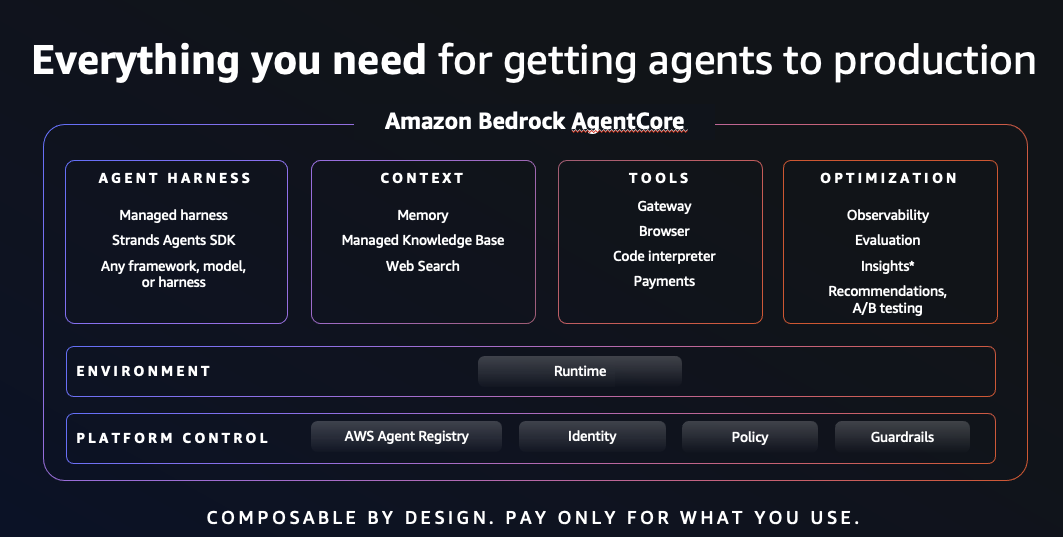
How it works — AgentCore layers
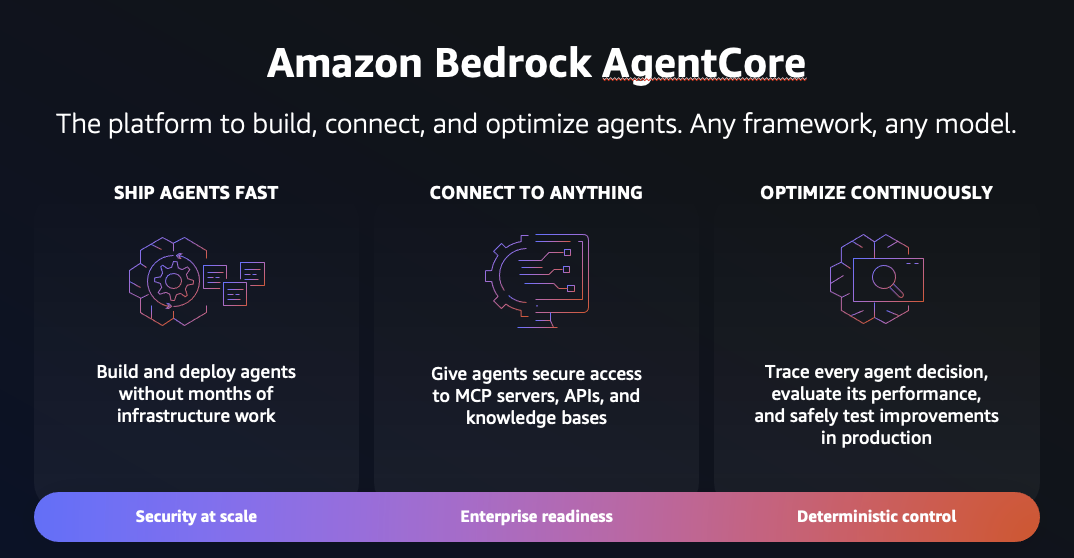
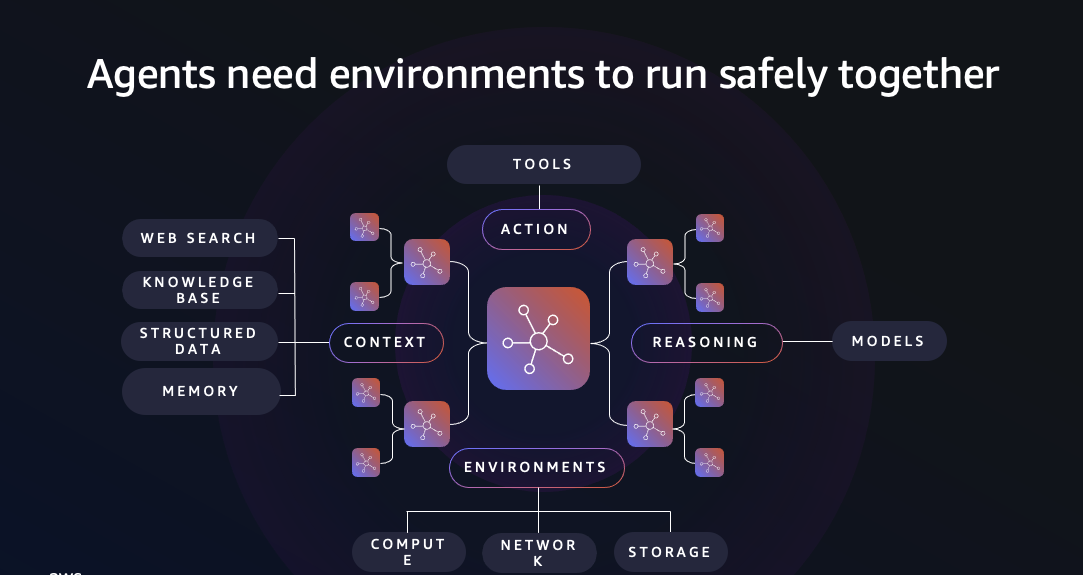
Runtime is where the agent runs (serverless host, per-session isolation, the invoke endpoint). Harness is how the agent thinks (the reason → act → observe loop that drives tools) — here, the Strands agent loop. Everything below runs inside each invocation.
Authorization is a dual-engine design: Cedar (AgentCore-native, at the Gateway) answers "under what conditions can this role do this?" — fast, attribute-based, formally verifiable. SpiceDB (Zanzibar ReBAC, on ECS Fargate) answers "who can access what?" by walking a relationship graph — recursive inheritance, multi-tenant isolation, agent delegation, time-bound and human-approval gates. They're complementary; both run on every relevant action.
AWS AgentCore — the official overview (source: AWS)
The request path — one turn, step by step
What happens when someone sends a message. Run a prompt in Chat, then return here: the steps that actually fired light up.
Why is Cognito in the chain? (and could it be Entra-direct?)
- Broker / stable issuer — swap or add IdPs behind Cognito without touching the Runtime/Gateway authorizer config.
- Pre-token Lambda — maps Entra group GUIDs → role + demogroups, stamps a clean name, and syncs SpiceDB group membership, all at token-mint time, outside the app. Entra has no equivalent inline hook.
- M2M tokens — the agent mints its own client-credentials token (Cognito resource server) to call the Gateway when there's no user token.
(here: Strands loop)
+ Guardrail (content · prompt-attack · PII)
Glossary — the terms, in plain English
Hover any underlined service in the request path for its definition, or scan the list below.